
Design toolkit for Windows and macOSFonts, colors and assets.In one app instead of ten tabs.
A font manager, brandboards, a moodboard, an image upscaler and five more tools for Windows and macOS. Everything runs locally on your computer, and the app is free.
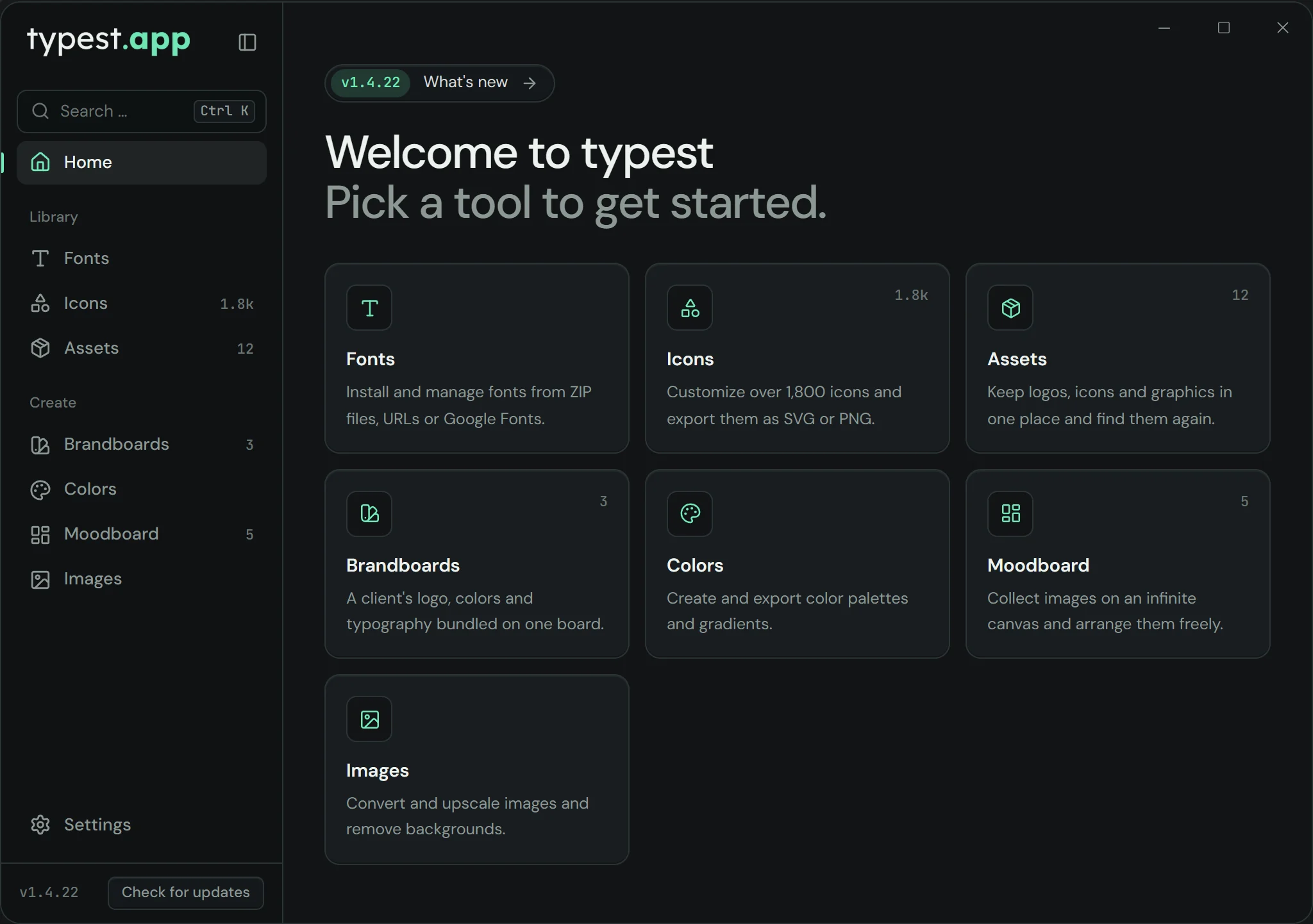
Try the interface right here
This demo mirrors the real app. Click through the fonts, open a sample brandboard, arrange images on the moodboard or pick another theme in the settings.
Nine tools, one interface
Your files are processed on your computer, not in the cloud. You don't need an account or a subscription.
Font manager
Browse ZIPs or pick from the Google Fonts catalog, install or uninstall with one click – with a real live preview.
Learn more: Font managerBrandboards
Upload a logo, auto-detect its colors, assign typography – export a finished brand system as HTML.
Learn more: BrandboardsMoodboard
Collect images on an infinite canvas and arrange them freely – zoom, resize, remove backgrounds, upscale and export, all saved automatically.
Learn more: MoodboardImage upscaler
Enlarge graphics & logos to 2×, 3× or 4× with high-quality, lossless Lanczos scaling.
Learn more: Image upscalerImage converter
Batch-convert PNG, JPEG, WEBP, AVIF, TIFF or GIF – straight into the destination folder of your choice.
Learn more: Image converterBackground Remover
Cut out logos, product photos and graphics – automatically and locally on your computer, refined by hand with a brush and edge brush when needed.
Learn more: Background RemoverAsset library
Keep logos, icons and graphics in one place, tag them, and find them again instantly via search.
Color palettes
Extract colors from logos, name them, assign roles (primary/secondary/accent) and reuse them anywhere.
Learn more: Color palettesIcon Library
Browse over 30,000 icons from nine open-source sets, social media logos included – adjust color and stroke width and export as SVG or PNG. Font Awesome Pro and Pro+ with your own account.
Why typest.app instead of separate tools?
What changes when your fonts, images and colors live in one app.
| typest.app | Separate tools & subscriptions | |
|---|---|---|
| Cost | One-time, free | Several subscriptions a month |
| Your data | Stays on your machine | Uploaded to the cloud |
| Tools | 9 tools in one app | 6+ separate apps & websites |
| Replaces | Font manager, upscaler, converter, background remover, icon and color tools | A separate app, web tool or subscription for each |
| Speed | Native & ready instantly | Depends on your internet connection |
What users say about typest.app
5.0 out of 5 · 1 review
Als Webdesigner habe ich schon viele Tools ausprobiert, aber keines hatte genau das, was ich gesucht habe. Typest ändert das komplett. Die Moodboard-Funktion hilft mir jeden Tag dabei, passende Bilder für Webseiten auszusuchen – gerade dann, wenn Kunden einem hunderte Bilder in teils fragwürdiger Qualität schicken. Die Bilder dann direkt per Klick umwandeln zu können, ist einfach super. Ich bin so begeistert, dass ich Typest auch weiter nutzen werde, falls es mal etwas kosten sollte.
Alessio
All reviews were submitted in the typest.app desktop app. We read every review before it is published and only remove spam and unlawful content, never negative reviews. We can't verify whether the reviewer actually uses the app.
What's new in typest?
Every change in the latest versions.
v1.6.3Current
- New: Custom Installer
- Fix: Various bug fixes
v1.6.0
- Icons: more than 30,000 instead of 1,800 – nine open-source sets including Tabler, Phosphor, Material Symbols and Font Awesome Free. Everything is built in and works without internet.
- Social media and brand logos such as Instagram, TikTok, LinkedIn or X – with the official brand color in one click and a short note on using them correctly.
- Font Awesome Pro and Pro+: with your own API token your premium icons show up too, sorted by license, family and style like on fontawesome.com. You can remove the token again in Settings.
- New filters for icon set, social media and brands, plus an overview of all icon licenses.
v1.5.0
- New design: a calmer interface in the style of typest.app, new fonts and reworked themes. Your own colors are kept.
- Remove background: “Refine” lets you fix the cut-out by hand – a brush to erase and restore, plus an edge brush.
- Command palette with Ctrl+K: quickly find sections, actions, brandboards and themes.
- Settings rebuilt: language (now only here), updates, appearance and “Paths” with a fixed output folder per tool and every program and data folder.
- A custom title bar in the app’s look, smooth transitions and new tooltips.
- Fixed: rotated phone photos came out scrambled when removing the background, palette and gradient names were lost when adding a color, font names disappeared at medium window widths.
Frequently asked questions
If something's missing here, ask the chat in the bottom right.
Is typest.app free?
Yes! typest.app is completely free – a one-time download, no subscriptions and no hidden costs.
Which operating systems does it support?
typest.app runs on Windows 10 and 11 (64-bit) and on macOS (Intel and Apple Silicon). Both versions are free on typest.app. A Linux version isn't planned at the moment.
Does my data really stay local?
Your files – fonts, images, brandboards, assets and moodboards – are processed locally on your machine and never uploaded. Only a few features fetch public data from the internet: the Google Fonts catalog (only after you agree in the font manager) and the update check. Your own files never leave your device. See our privacy policy for details.
Which tools are included?
Font manager, brandboards, image upscaler, image converter, asset library, color palettes & gradients, a background remover, an icon library, plus a moodboard – all in one app.
Can I install Google Fonts?
Yes, browse the Google Fonts catalog right inside the font manager and install any font with one click – fonts are downloaded on demand, not bundled with the installer.
What's a brandboard?
A brandboard bundles a brand's logo, colors and typography on one board – colors can be auto-extracted from a logo, and you can export the finished board as HTML.
What is the moodboard?
The moodboard is an infinite canvas for your images: drop in photos and graphics, zoom and pan freely, resize them and arrange them as a gap-free bento grid with one click. You can create several projects and, with a right-click, upscale images, remove backgrounds or export them as WebP, JPG and PNG. Everything is saved automatically and your original files stay untouched.
Can I customize how the app looks?
Yes. In the settings you pick one of five ready-made themes (Mint, Ocean, Violet, Amber or Light) or set the background, panel, text and accent colors yourself. The logo follows the colors too. You can try it in the interactive demo on typest.app, under "Settings".
Can I undo changes in the moodboard?
Yes. In the moodboard, Ctrl+Z (Cmd+Z on a Mac) undoes the last change – move, resize, bento arrangement, add, delete, upscale and remove background. Ctrl+Shift+Z brings it back. Deleted images can be restored this way, too.
How do I export a color palette as .ase for Photoshop?
Under "Colors" you create a palette with at least two colors and choose "Export as .ase". Import the .ase file in Photoshop through the Swatches panel. Gradients export as .ase swatches with in-between colors or as a .grd file.
How do I get updates?
On Windows and macOS, typest.app checks for new versions automatically, downloads them in the background and installs them the next time you restart the app. After an update, a short window shows what's new. You can check manually with “Check for updates” at the bottom of the sidebar. Mac versions before 1.4.21 only show a notice instead – then download the current DMG once with the download button.
How do I install Google Fonts on Windows or macOS?
In the typest.app font manager, switch to "Google Fonts", find the font, select it and click "Install selected". You choose whether it's installed just for you or for all users. It's then available right away in Photoshop, Illustrator and every other app.
How do I enlarge a logo without losing quality?
Use the typest.app image upscaler: select the images, pick 2×, 3× or 4× and save. Lanczos scaling keeps edges sharper than simple resizing, and a slider shows before and after. If the logo exists as an SVG, that's always the best source; the upscaler helps when all you have is a small bitmap.
Can I remove an image background without uploading it?
Yes. The typest.app background remover cuts out logos, product photos and graphics with an AI model that runs on your own computer. The image never leaves your device. On the moodboard you can also reach it by right-clicking an image.
How do I convert many images to WebP or AVIF at once?
In the typest.app image converter, select the images, set the target format (PNG, JPEG, WEBP, AVIF, TIFF or GIF) and click "Save to folder". All selected images are converted in one go and saved to the folder you choose.
How do I reach support?
The fastest way is email at support@typest.app – we'll get back to you as soon as possible.
Ready in three steps
You don't need an account, and there's nothing to set up.
- 01
Download & install
One installer for Windows, one DMG for macOS (Intel and Apple Silicon). No account, no setup.
- 02
Manage fonts, colors & assets
Everything in one place: install fonts, extract colors from logos, build brandboards and moodboards, convert, upscale and cut out images.
- Font manager
- Brandboards
- Moodboard
- Image upscaler
- Image converter
- Background Remover
- Asset library
- Color palettes
- Icon Library
- 03
Keep working right away
Installed fonts show up in Photoshop, Illustrator and the like right away. Export brandboards as HTML, color palettes as .ase and icons as SVG or PNG.
- HTML
- .ase
- SVG
- PNG
Download typest.app
Free for Windows and macOS. Your fonts, colors and assets stay on your computer.

Version 1.6.31 · ~264 MB · Windows 10 & 11 (64-bit)
macOS: version 1.6.31 · ~403 MB · Intel & Apple Silicon