
Font manager: install fonts on Windows and macOS

The typest.app font manager installs fonts in one click, from your own ZIP archives, from a link or straight from the Google Fonts catalog. Before installing, you see every font in a live preview with your own text. Once installed, it's available right away in Photoshop, Illustrator and every other app.
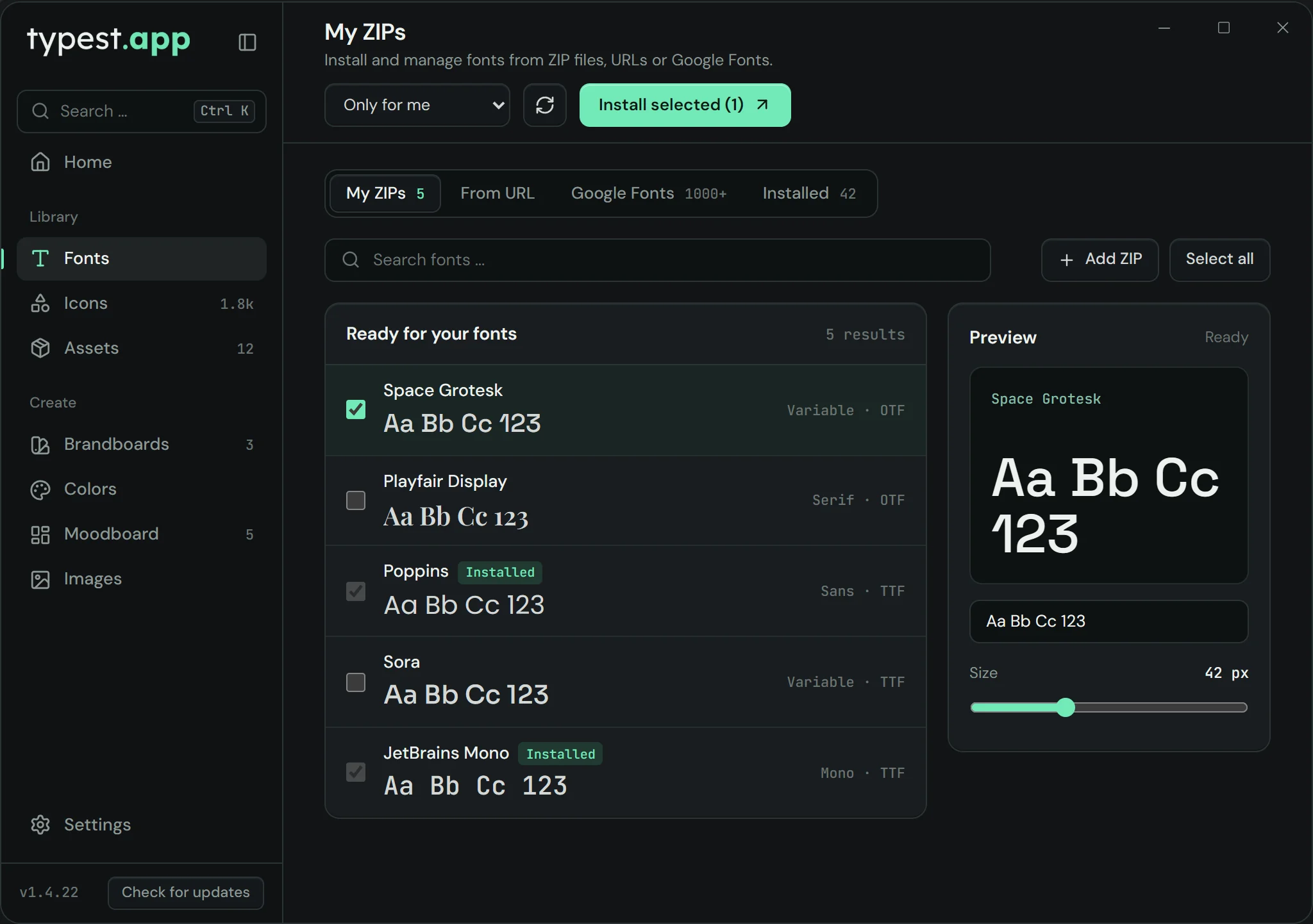
typest.app font manager: fonts from ZIP archives with live preview and install options

How it works

  1. 1

    Pick a source

    Choose "My ZIPs", "From URL" or "Google Fonts" at the top. Drag ZIP archives into the window; for "From URL" paste a link to a font file or a ZIP.

  2. 2

    Compare fonts

    Search the list and check each font in the live preview, with your own sample text and at any size.

  3. 3

    Install

    Select the fonts you want, choose "Only for me" or "All users (system)" and click "Install selected".

  4. 4

    Manage

    "Installed" lists every installed font; remove the ones you no longer need in one click.

What is a font manager?

A font manager is an app for viewing, comparing, installing and removing fonts. Windows and macOS only cover the basics: you can install single font files, but you can't browse ZIP archives, install Google Fonts directly or compare several fonts with your own text before installing them.

When a font manager is worth it

As soon as you work with fonts regularly. Typical cases:

  • Clients keep sending you font packages as ZIP files.
  • You want to compare several fonts side by side for a logo or a presentation.
  • You use Google Fonts and don't want to download and unzip every family by hand.
  • You want to see which fonts are installed on your computer and clean out old ones.

Only for me or all users?

On Windows you decide with every install: "Only for me" installs the font in your user account and needs no administrator rights. "All users (system)" installs it for every account on the computer and needs administrator rights. "Only for me" is usually enough, but some older apps, and apps running with administrator rights, only find fonts installed system-wide.

On a Mac, typest.app installs fonts in your user folder (~/Library/Fonts), where macOS picks them up on its own.

Frequently asked questions

Is the font manager free?

Yes. The font manager is part of typest.app, and the whole app is free, with no subscription and no account.

Can I install Google Fonts directly?

Yes. Under "Google Fonts" you search the catalog and install fonts in one click. The catalog only loads once you agree in the font manager.

Does it work with fonts from a ZIP?

Yes. Drag the ZIP archive into the window or paste a link under "From URL". typest.app detects the fonts inside automatically and lists them for you to pick.

Which font formats can I install?

TrueType (.ttf), OpenType (.otf) and font collections (.ttc), plus .fon on Windows. WOFF and WOFF2 are web fonts for websites and can't be installed as desktop fonts.

Does the font manager work on a Mac?

Yes. typest.app is available for Windows 10 and 11 (64-bit) and for macOS on Intel or Apple silicon. On a Mac, installed fonts go into your user folder.

How do I remove a font again?

Open "Installed", select the font and click "Remove selected".